
ARGODRIVE DS4 KIMI K3.1 / SETUP + BENCHMARKS
Run Kimi 3.1 locally
on one GPU.
Argodrive DS4 Kimi K3.1 is the inference engine. This one repository includes the Kimi CUDA port, NVMe expert streaming, caches and weight-preparation tools. You do not need to install upstream ds4 or the separate Argodrive Mac app.
Kimi K3.1 Pro: a 2.8-trillion-parameter model, 1.45 TB of experts on disk, and 3.1 tokens per second on raw text with a drafter that keeps the answer identical. Tested on one 96 GB RTX PRO 6000 Blackwell. Here is the CUDA code, the setup, the measurements and the limits.
Can I run Kimi 3.1 locally on one GPU?
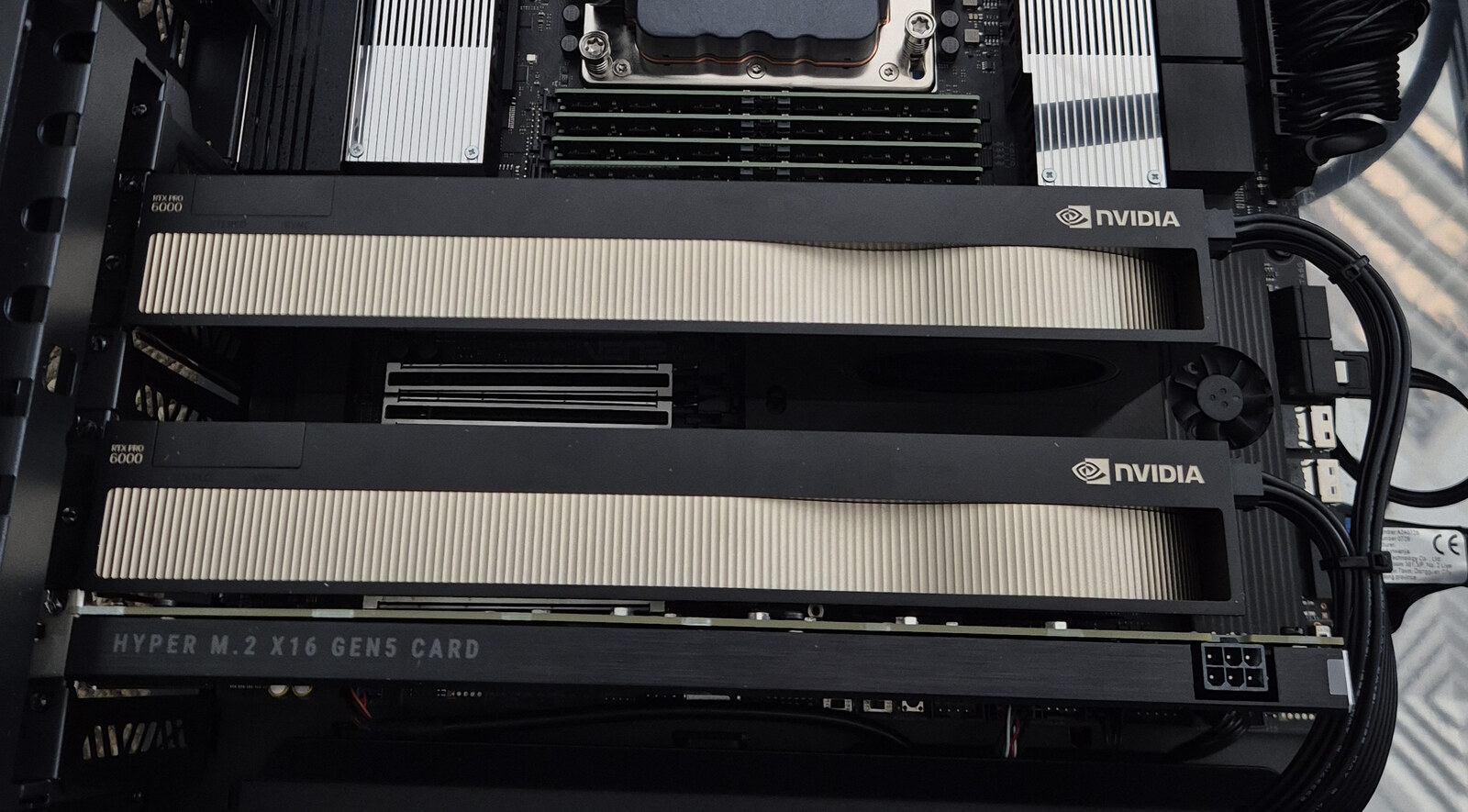
Yes, using this experimental CUDA port on one RTX PRO 6000 Blackwell with 96 GB of VRAM. Argodrive DS4 Kimi K3.1 streams the selected experts from NVMe through GPU and host-memory caches. The measured machine also has 70 GiB of VM RAM and five physical NVMe devices arranged as three storage tiers. The full model does not need to fit in GPU memory. This is explicit expert streaming, not operating-system swap or a cloud API.
Decode and prefill are different measurements.
The November 6 runs use a Q8_0 spine, MXFP4 experts, a full-precision attention cache and greedy decoding. There is no speculative drafter or expert skipping. Monitoring was off. The tables retain every reported repeat.
| Generated tokens | Steady decode, tok/s | Prompt pass, s | Process wall, s |
|---|---|---|---|
| 128 · repeat 1 | 2.04 | 17.25 | 90.275 |
| 128 · repeat 2 | 2.04 | 17.23 | 90.274 |
| 512 · repeat 1 | 1.94 | 17.34 | 291.319 |
| 512 · repeat 2 | 1.94 | 17.35 | 291.323 |
Steady decode divides the tokens after the first by the elapsed time after the first token. It excludes model loading, prefill and the first decode step. Process wall includes startup through exit. Neither the prompt-pass duration nor the steady rate is an end-to-end time-to-first-token measurement.
Measured prompt processing, not output generation speed.
| Prompt tokens | Prompt pass, s | Expert reads, GB | Generated tokens | Generation tok/s |
|---|---|---|---|---|
| 270 | 25.38 / 25.34 | 924.53 | 200 | 1.96 / 1.93 |
| 618 | 31.71 / 31.51 | 1,122.31 | 200 | 1.90 / 1.90 |
| 1,533 | 36.81 / 37.12 | 1,240.82 | 8 | Too short to quote |
Here generation rate is generated tokens divided by the reported decode duration, including the first step; it differs from the steady metric above. Expert bytes are the reported prompt-pass read volume, not an independently reconciled physical-device counter. The eight-token run supports the prefill measurement only.
Prompt length grows 5.7× from 270 to 1,533 tokens, while the prompt pass grows from about 25 to 37 seconds. More tokens reuse experts already needed by the batch. The longer prompt reads about 86% of the expert payload once; its higher tok/s is not a 41 tok/s decode claim.
Short-prompt measurements: why startup matters
“The capital of France is” is a five-token raw prompt. With 17 generated tokens, sequential prefill reached 2.07 / 2.08 / 2.08 steady tok/s and 29.329 / 29.231 / 29.131 seconds process wall. Default batched prefill reached 1.98 / 1.97 / 1.96 steady tok/s and 36.135 / 36.032 / 36.034 seconds wall. These arithmetic paths can produce different text. A short-answer rate alone hides much of the time a user waits.
A drafter that leaves the answer unchanged.
Since 7 November there is an optional drafter. Qwen3-0.6B-Base proposes up to fifteen next tokens from the text so far, stopping at the first one below a confidence gate. The engine checks a proposal in one block of up to 16 rows, the current token plus the drafts, and keeps the drafts up to the first one Kimi disagrees with. With no proposal it takes an ordinary decode step. The tokens it emits are always Kimi’s own choices.
| Prompt | Generated | Plain, tok/s | With drafter, tok/s | Gain | Drafts accepted | Tokens from blocks |
|---|---|---|---|---|---|---|
| “The three main financial statements are” | 128 | 2.02 | 2.90 / 2.92 | +44% | 97 of 107 | 91% |
| same | 200 | 1.98 / 1.99 | 3.10 / 3.11 | +56% | 164 of 174 | 94% |
| same | 512 | 1.88 | 3.11 | +65% | 443 of 459 | 96% |
| The public 512-token benchmark prompt | 200 | 1.52 / 1.53 | 2.64 / 2.67 | +74% | 185 of 185 | 99% |
| A 286-token chat prompt, chat settings | 200 | 1.92 / 1.94 | 2.01 / 2.02 | +4% | 35 of 39 | 24% |
The speed comes from the storage. A block reads each expert once for all its rows, so a full 16-row block takes about 3.8 s against about 8 s for sixteen plain steps. Two changes on 7 November made blocks cheaper and wider. The spine’s matrix multiplies now load each weight once for up to eight rows instead of once per row, which took the record prompt over 200 tokens from 2.81 to 2.97 tok/s. And a block may take from 2 to 16 rows instead of exactly 8, which took it to 3.10. The cache needed one change: a block touches more experts than the caches hold, so plain least-recently-used eviction got no hits at all. Keeping only the experts that enough of the block’s rows use cut a block’s disk reads by a quarter to a third.
The answers are the same. A block’s rows run the same arithmetic as plain steps. In this release’s runs we hashed the logits of 3,416 positions in both paths and found no differing bit; the first drafter release’s checks covered 5,325 positions and every layer of 40. The token IDs match, over all 512 tokens of the long run too. That includes forced rejections of the first, a middle and the last draft, short proposals, an end-of-text token inside a block, and a drafter that crashes or answers garbage, which falls back to plain decoding. This is evidence from these runs on this GPU and driver, not a proof for every input.
Chat gains a little, with a stricter gate. Qwen is rarely right for long on chat text. With the raw settings the drafter made a 286-token chat prompt slower, 1.80 tok/s against 1.95. With a gate that starts at 0.9 and adapts to how the last proposal fared, it went from 1.92 / 1.94 to 2.01 / 2.02 tok/s. That’s a small gain, so the drafter stays off for chat unless you ask for it. The gain depends on how predictable the text is, and the raw prompts above are predictable. France, a 5-token prompt with 17 tokens generated, fires 2 blocks: 2.17 / 2.19 / 2.20 tok/s against 1.95 plain.
One GPU, three storage tiers.
The tested environment is a 70 GiB VM on a Threadripper host with one 96 GB RTX PRO 6000 Blackwell. The reported allocation includes a 27.5 GB device expert cache and a 53.7 GB pinned host pool. The non-expert spine resides in VRAM, with matrices quantised to Q8_0.
3 NVMe devices
79,365 expertsThe hottest experts occupy the primary array.
1 NVMe device
41,078 expertsCompletes the model’s coverage and holds additional copies.
1 NVMe device
74,000 copiesReplicas give the read scheduler another source.
The union of tiers A and B holds all 82,432 experts. Each expert is a 17,547,264-byte MXFP4 file; the unique expert payload is about 1.45 TB. Replica counts overlap and are not additional model parameters. Checkpoint downloads, the spine and replicas require storage beyond that unique payload.
Read the experts the router needs.
Illustrative activity, not live telemetry or a recorded trace. Colours show possible sources, not measured hit rates.
Kimi K3.1 Pro has 92 MoE layers, 896 experts per layer and 16 selected experts per token. The engine keeps the resident computation on the GPU and schedules the selected experts through three paths:
- Use a cached expert. A device-cache hit is ready to compute; a host-pool hit needs an upload.
- Choose a disk source by expected completion time. Available replicas, assumed read rates and in-flight work determine where a read is sent. Decode fills use two chunks; prompt-pass fills use whole files by default.
- Overlap arrivals with useful work. O_DIRECT readers fill a pinned arena. Expert computation starts as slabs arrive, with per-tier concurrency caps, eight upload streams and shallow next-layer prefetch.
A layer still waits for its last required expert. More drives help only if placement and scheduling reduce that wait. The documented rates and queue limits are tuning inputs for this machine, not a universal optimal configuration.
Get Argodrive DS4 Kimi K3.1. Build, prepare, run.
Installing for the first time? Follow the step-by-step Kimi installation guide for download, extraction, conversion and first-run commands. The summary below pins the benchmark engine.
- Get and build this repository. The ds4-based runtime and Kimi support are already integrated.
- Download the Kimi K3.1 checkpoint separately. Use the included tools to prepare the spine and expert files for your NVMe storage.
- Run the included engine. Use the command-line interface or its OpenAI-compatible chat endpoint. The Qwen drafter is optional.
Get the source from argodrive-ds4-kimi-k3.1. This is a source release, not a prebuilt installer; model weights are not bundled. Use a compatible NVIDIA driver, CUDA toolkit, C/C++ build tools and Python dependencies for weight preparation. This checkout pins the November 7 engine used for the 3.11 tok/s drafter result. The drafter is optional and needs the additional setup below.
git clone https://github.com/argonautlabsai/argodrive-ds4-kimi-k3.1.git
cd argodrive-ds4-kimi-k3.1
git checkout 6808130f7ff9fc94ff89e5535d308fc6b9589eb4
make ds4 CUDA_ARCH=sm_120
Prepare the checkpoint using k31_extract.py and k3_spine_to_gguf.py. The spine metadata records the primary and secondary expert directories. The weight-layout guide explains sparse-file requirements and the optional third and fourth directories.
With the converted spine and all expert files in place, this is the plain, drafter-off 128-token financial-prompt configuration. Replace the example paths with your own prepared files:
DS4_K3_EXPERT_DIR_C=/data/tier-c/experts \
./ds4 -m /data/kimi/k3-spine.gguf \
  --cuda --ssd-streaming --ssd-streaming-cold \
  --ssd-streaming-cache-experts 16 \
  --temp 0 -c 2048 -n 128 \
  -p "The three main financial statements are"
Repeat with a fresh process, then change -n 128 to -n 512 for the longer run. Record the engine’s K3 decode split steady rate and process wall separately. Leave the full-precision attention-cache default in place. Measure your storage before changing the scheduler’s rate assumptions.
The optional drafter needs commit 6808130 or later for the results above (c0dcf69 had the first version), Python with CUDA torch, transformers, tokenizers, tiktoken and regex, and the Qwen3-0.6B-Base checkpoint. The README has the settings.
The public JSON contains the raw completion prompts, individual measurements and chat prompt lengths. It does not include the full chat prompt texts or an exact expert-placement manifest; it is not a complete reproduction bundle for every chat row or this machine’s disk layout. The timings above are recorded results, not a performance guarantee for another setup.
What is established—and what remains open.
Since 7 November, runs with the optional drafter match plain decoding bit for bit in everything we compared: 3,416 logit vectors in this release’s runs and 5,325 in the first drafter release’s, and every token ID, across 128, 200 and 512 generated tokens, the public prompt and chat. Details above.
Repeats of the same configuration produced identical token IDs in the fresh-process tests, or identical text through the chat endpoint. The project also reports matching 128- and 512-token outputs with and without resident-first expert ordering.
That does not establish equality across arithmetic paths. Sequential versus batched prefill, attention-cache precision and expert GEMM choices can change near-tie tokens. Nor does repeatability validate the Q8_0 spine against the original model. No comparison with Moonshot’s own implementation has been completed.
The DSA indexer remains unimplemented. Dense attention is used within a 2,048-token total context. The expected equivalence inside that window is the implementation’s rationale, not a completed reference-quality test. Long-context K3.1 support is outside this release’s claim.
These results concern K3.1 Pro on CUDA. Earlier Kimi K3 results on a Mac used a different model version, backend, hardware and drafting configuration, so they are not a controlled speedup baseline for this article.
Kimi 3.1 local inference: common questions.
What hardware do I need?
The published setup uses one 96 GB RTX PRO 6000 Blackwell, 70 GiB of RAM assigned to an Ubuntu VM, and five NVMe devices. The unique expert files occupy about 1.45 TB; allow additional space for the checkpoint, spine and replicas. These are tested conditions, not proven minimum requirements. This article does not establish that the port runs on a 24 GB or 32 GB GPU.
Is Kimi generating 44 tokens per second?
No. 44 tok/s is prompt processing (prefill) on a 1,512-token prompt. 3.11 tok/s is measured decode on a predictable raw financial-text completion with the optional Qwen drafter. The tested chat prompt reached 2.01–2.02 tok/s with its chat settings. Prompt, output length and timing definition matter; see the complete drafter table.
Does the drafter replace Kimi with a smaller model?
No. Qwen proposes tokens and Kimi verifies them. The published tests produced the same token IDs as plain decoding, including the 512-token run. This comparison is against this port’s plain path; it is not validation against Moonshot’s reference implementation.
Do I need to install ds4 and the Argodrive Mac app separately?
No. Argodrive DS4 Kimi K3.1 already includes the ds4-based runtime, the Kimi port and NVMe streaming. Build this repository for the Linux/NVIDIA setup. Argodrive is the separate storage measurement and monitoring project. Earlier Deltafin results concern Kimi K3 on Apple silicon, not this K3.1 CUDA benchmark.
Can I just download and run it?
Download or clone the engine source, build it with CUDA, and prepare the separately downloaded Kimi weights using the included tools. There is currently no prebuilt installer or bundled model. The setup instructions and tested hardware describe what you need.
Is this full long-context Kimi K3.1 support?
No. The published benchmark profile has a 2,048-token total context limit and uses dense attention without the DSA indexer. The code and results demonstrate local, single-GPU execution within that scope. Read the validation limits before choosing it for your workload.
CODE / DATA / NEXT STEPS
Inspect the work. Reproduce the measurements.
- Every reported run, as JSON
- The wider-block drafter runs, as JSON
- The first drafter runs, as JSON
- The wider-block drafter commit: 6808130
- The first drafter commit: c0dcf69
- Pinned CUDA release: k31-cuda-20261105
- Configuration knobs, layout and arithmetic comparisons
- Argodrive: storage measurement and monitoring tools
This port builds on Salvatore Sanfilippo’s ds4, with its acknowledgements to llama.cpp and GGML preserved. The Kimi checkpoint is Moonshot’s work. Argonaut Labs develops the port and storage experiments with assistance from Claude and ChatGPT, with human-led testing and review.
The CUDA engine and the Argodrive Mac app are separate projects. The benchmark was run with monitoring off. Better storage placement and overlap remain useful research directions; reference-model validation and DSA support are equally important next steps.